Project
- Stars
- Started
- Issues
- License
Read Windows apps on your braille display
NVDA brings Windows apps, web pages and documents to your Focus or PAC Mate braille display. It sends text to the cells and lets you navigate with the display’s keys.
Install NVDA and the Freedom Scientific display driver, then connect by USB or supported Bluetooth. Current NVDA releases need a supported 64-bit version of Windows 10 or 11.
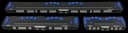
Focus and PAC Mate displays
Selected models supported
Focus 1 44, Focus 1 70, Focus 1 84, Focus 2 40, Focus 2 80, Focus Blue 14, Focus Blue 40, Focus Blue 80, PAC Mate 20, and PAC Mate 40
How did it go? Tips, problems, questions…
Read Windows apps on your braille display
NVDA brings Windows apps, web pages and documents to your Focus or PAC Mate braille display. It sends text to the cells and lets you navigate with the display’s keys.
Install NVDA and the Freedom Scientific display driver, then connect by USB or supported Bluetooth. Current NVDA releases need a supported 64-bit version of Windows 10 or 11.
nvaccess
On GitHub
Focus and PAC Mate displays
Selected models supported
Focus 1 44, Focus 1 70, Focus 1 84, Focus 2 40, Focus 2 80, Focus Blue 14, Focus Blue 40, Focus Blue 80, PAC Mate 20, and PAC Mate 40
Feedback
How did it go? Tips, problems, questions…