Project
- Stars
- Started
- Issues
- License
Run a cloud-backed AI agent on your TV box
Build a Telegram-controlled Claude API agent on a compatible Android TV box. API usage is billed, and background operation depends on the device.
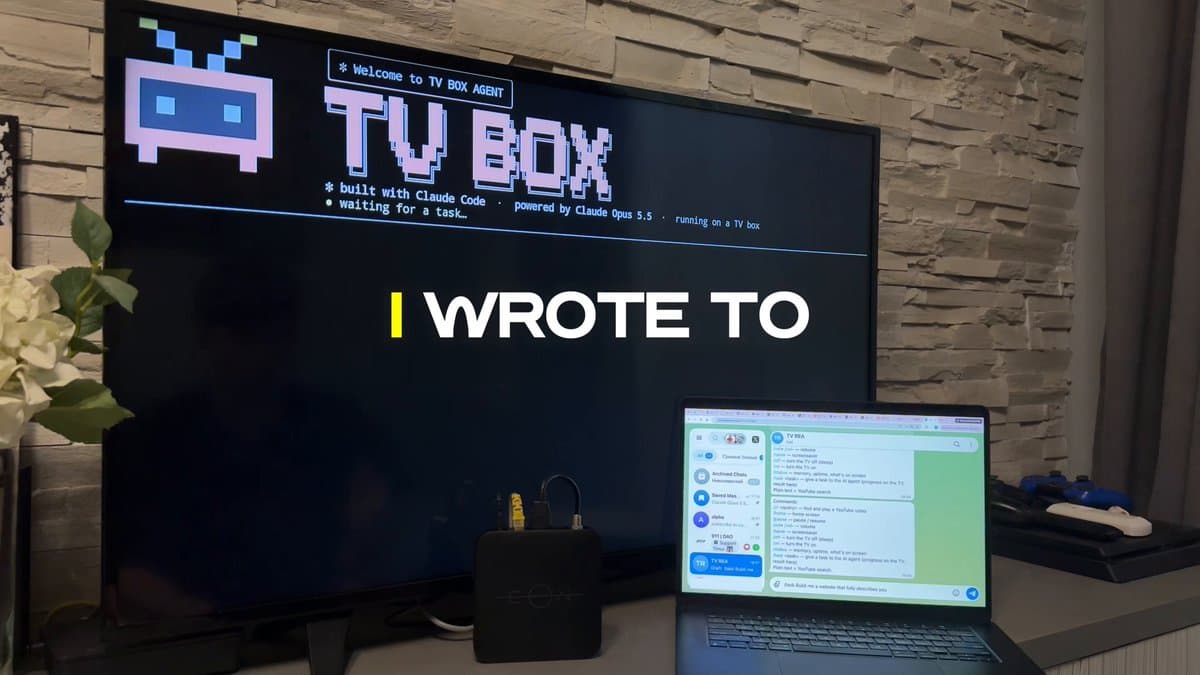
Accuracy-adapted prompt based on the linked source: This is my own TV box on my own home network. I want it to work as an always-on home server for an AI agent. I will not connect to my Telegram bot, the box does the work, even when my computer is off and sends me the result, and the TV can work as a live terminal if I want. I'll turn on developer mode myself with the remote and approve the connection on the TV. I authorize you to connect to it with ADB, Android's official developer tool, and to install and configure what I want. Every change must be reversible. I've attached a photo of my TV box (or its Settings → About screen). Done means: when I send my bot /task <anything>, it answers that it started, an agent on the box does the task with the Claude API (choose an available model ID from the current Claude API documentation) and sends me the result in Telegram, all with my laptop off. Record the run into a schedule. If I opt in, the TV becomes a live terminal that shows the agent's thinking and each line of code as it's written, and opens finished web pages. When a step doesn't need me, keep going. Identify the model from the photo. It must run Android TV, Google TV or Fire OS on Android 7 or newer. RoKu, Apple TV, Tizen, webOS and the new Vega OS Fire TVs can't run this, so tell me and stop. Warn me if it has less than 2 GB of RAM. Install adb from official sources if it's missing. Tell me exactly what to press on my remote to turn on Developer options and USB or Wireless debugging, and to find the box's IP. If adb connect is refused, use Wireless debugging pairing. On macOS, 'No route to host' usually means the terminal needs Local Network access. Install Termux and Termux:Boot from their official F-Droid releases (both from the same source), matching the CPU ABI the system reports; many boxes run a 32-bit system on a 64-bit CPU. If the box has no web browser, install TV Bro from its official GitHub releases. If Play Protect blocks an install, tell me what to press; never turn security settings off yourself. Request a Termux wake lock and battery-optimization exemption, then test background operation and autostart with Termux:Boot. These do not guarantee Android will keep every process alive. If the box blocks autostart, tell me what to open after a reboot. Before asking for any secret, create a small script that reads it with hidden input and stores it on the box readable only by Termux. Then tell me how to create a bot with @ BotFather and get an API key in the Claude Console with a monthly spend limit, and let me paste those into that script myself. Never print, log or commit a key. The bot obeys only the Telegram account that sends /start first. Use outbound long polling only and open no ports to the internet. Run the agent on the Messages API with streaming and tools to fetch a URL, write files, run Python and open a page on the TV. If the official SDK won't install on this box, call the API over HTTPS directly. Give it a short system prompt saying what it is and where it runs, ask for single-file web pages, and cap spend and steps per task. When I ask for something recurring (every hour, every morning), schedule it on the box with cron and send each result to Telegram. Ask me whether to turn the TV into a live terminal. If yes, Termux in full screen with 'waiting for a task', then the task, the model's thinking, each line of code as it's written, tool calls and a final DONE line with the cost. Run one short test task, tell me what it cost, and end. Ask me what sheet undo to send tasks, restart the agent and change a key and how everything. Never type passwords or sign in for me, never root or flash anything, no pirate sites.
Accuracy-adapted prompt based on the linked source: This is my own TV box on my own home network. I want it to work as an always-on home server for an AI agent. I will not connect to my Telegram bot, the box does the work, even when my computer is off and sends me the result, and the TV can work as a live terminal if I want. I'll turn on developer mode myself with the remote and approve the connection on the TV. I authorize you to connect to it with ADB, Android's official developer tool, and to install and configure what I want. Every change must be reversible. I've attached a photo of my TV box (or its Settings → About screen). Done means: when I send my bot /task <anything>, it answers that it started, an agent on the box does the task with the Claude API (choose an available model ID from the current Claude API documentation) and sends me the result in Telegram, all with my laptop off. Record the run into a schedule. If I opt in, the TV becomes a live terminal that shows the agent's thinking and each line of code as it's written, and opens finished web pages. When a step doesn't need me, keep going. Identify the model from the photo. It must run Android TV, Google TV or Fire OS on Android 7 or newer. RoKu, Apple TV, Tizen, webOS and the new Vega OS Fire TVs can't run this, so tell me and stop. Warn me if it has less than 2 GB of RAM. Install adb from official sources if it's missing. Tell me exactly what to press on my remote to turn on Developer options and USB or Wireless debugging, and to find the box's IP. If adb connect is refused, use Wireless debugging pairing. On macOS, 'No route to host' usually means the terminal needs Local Network access. Install Termux and Termux:Boot from their official F-Droid releases (both from the same source), matching the CPU ABI the system reports; many boxes run a 32-bit system on a 64-bit CPU. If the box has no web browser, install TV Bro from its official GitHub releases. If Play Protect blocks an install, tell me what to press; never turn security settings off yourself. Request a Termux wake lock and battery-optimization exemption, then test background operation and autostart with Termux:Boot. These do not guarantee Android will keep every process alive. If the box blocks autostart, tell me what to open after a reboot. Before asking for any secret, create a small script that reads it with hidden input and stores it on the box readable only by Termux. Then tell me how to create a bot with @ BotFather and get an API key in the Claude Console with a monthly spend limit, and let me paste those into that script myself. Never print, log or commit a key. The bot obeys only the Telegram account that sends /start first. Use outbound long polling only and open no ports to the internet. Run the agent on the Messages API with streaming and tools to fetch a URL, write files, run Python and open a page on the TV. If the official SDK won't install on this box, call the API over HTTPS directly. Give it a short system prompt saying what it is and where it runs, ask for single-file web pages, and cap spend and steps per task. When I ask for something recurring (every hour, every morning), schedule it on the box with cron and send each result to Telegram. Ask me whether to turn the TV into a live terminal. If yes, Termux in full screen with 'waiting for a task', then the task, the model's thinking, each line of code as it's written, tool calls and a final DONE line with the cost. Run one short test task, tell me what it cost, and end. Ask me what sheet undo to send tasks, restart the agent and change a key and how everything. Never type passwords or sign in for me, never root or flash anything, no pirate sites.
How did it go? Tips, problems, questions…
Run a cloud-backed AI agent on your TV box
Build a Telegram-controlled Claude API agent on a compatible Android TV box. API usage is billed, and background operation depends on the device.

Feedback
How did it go? Tips, problems, questions…