Project
- Stars
- Started
- Issues
- License
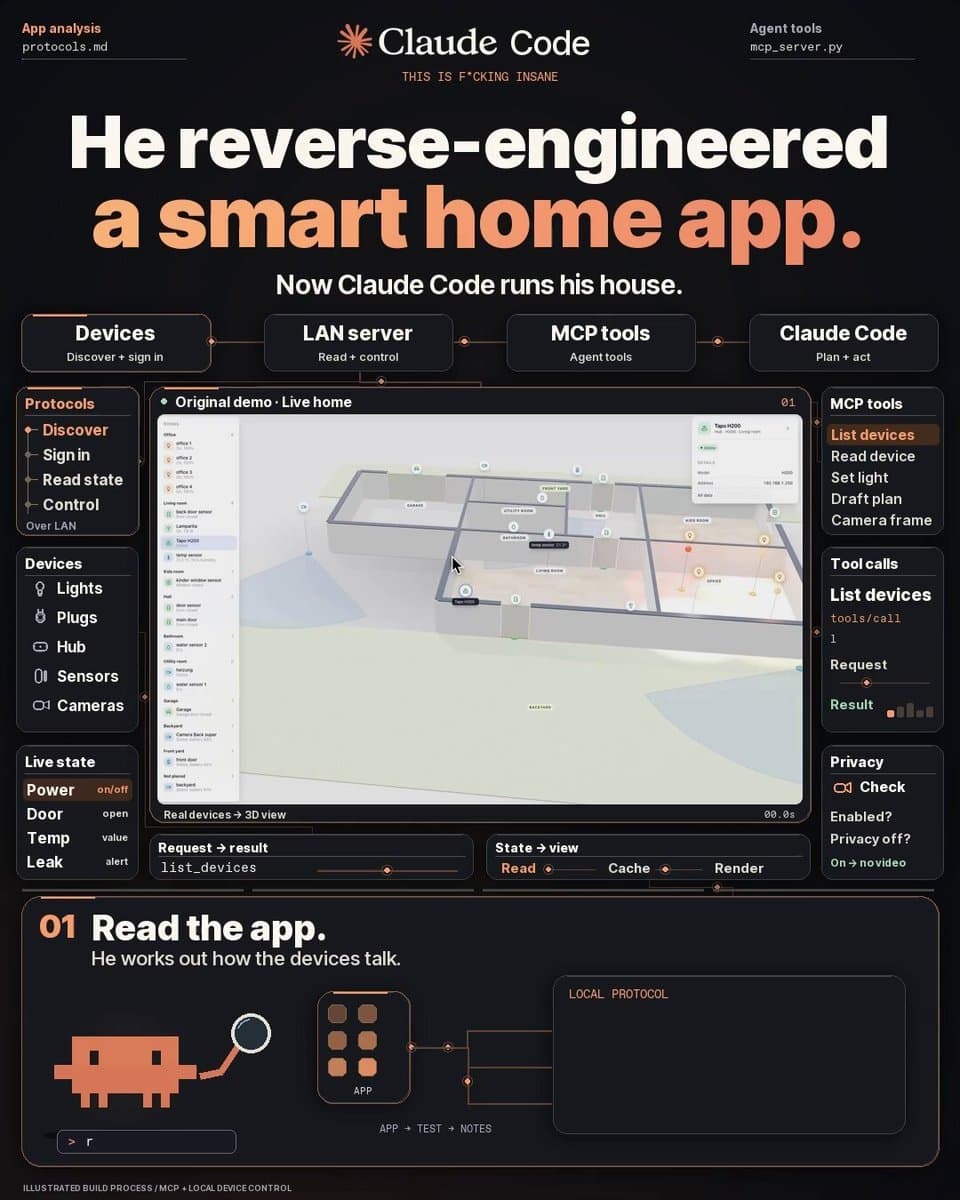
Control Tapo devices with a live 3D dashboard
Connect supported Tapo devices to Claude through tolpo and build a local 3D home dashboard with live states and selected camera feeds.
How did it go? Tips, problems, questions…
You are my build partner. Help me connect my TP-Link Tapo smart home devices to Claude using tolpo, then set up a live 3D view of my home. Work step by step, explain each step simply, and ask before installing anything. PROJECT https://t.co/OmSoRUToVk Read the current documentation first. Use the existing project and check which features work with my device models. GOAL I can ask Claude to control my lights and check my sensors in plain English. A local web page shows a 3D model of my home, with each device in its room and its current state. When a door sensor reports open, the door opens in the model. Clicking an enabled camera shows its live video. HOW IT CONNECTS My computer and Tapo devices are on the same local network. tolpo authenticates using my own Tapo account and talks directly to supported devices over the LAN. Claude connects to tolpo through its MCP server. tolpo's local web server displays the 3D house in my browser. PIPELINE Step 1: check my operating system, installed software and Tapo device models. Tell me what's supported, what hasn't been tested and what I need to install. Step 2: help me configure credentials locally, then run a read-only scan. List the devices found and flag anything unreachable. Step 3: connect tolpo to Claude. Test reading device states with questions like "which lights are on?" and "is any door open?" Step 4: after I approve, test one light: switch it on, change its brightness, then restore its original state. Step 5: draft a floor plan from the device names. Infer room names in English, German or Spanish where supported. Ask me to correct room assignments, dimensions and positions before saving. Step 6: open the local 3D dashboard. Check that devices appear in the right rooms and that their displayed states match the physical devices. Step 7: help me enable only the cameras I choose. Check privacy mode before opening video, and verify playback in the dashboard. Step 8: test a door sensor and a light against the 3D view. Check how the dashboard reports an unreachable device. PRIVACY AND CONTROL RULES (hard) Keep passwords and tokens out of chat and the repository. Guide me through entering them locally. Start read-only. Ask before changing device states or settings. Respect camera privacy mode. Never disable it automatically. Explain which device data or camera images would be sent to Claude. Local device communication does not mean the AI model runs locally. Start with step 1: ask which operating system and Tapo devices I have, then tell me what software and accounts I need.
You are my build partner. Help me connect my TP-Link Tapo smart home devices to Claude using tolpo, then set up a live 3D view of my home. Work step by step, explain each step simply, and ask before installing anything. PROJECT https://t.co/OmSoRUToVk Read the current documentation first. Use the existing project and check which features work with my device models. GOAL I can ask Claude to control my lights and check my sensors in plain English. A local web page shows a 3D model of my home, with each device in its room and its current state. When a door sensor reports open, the door opens in the model. Clicking an enabled camera shows its live video. HOW IT CONNECTS My computer and Tapo devices are on the same local network. tolpo authenticates using my own Tapo account and talks directly to supported devices over the LAN. Claude connects to tolpo through its MCP server. tolpo's local web server displays the 3D house in my browser. PIPELINE Step 1: check my operating system, installed software and Tapo device models. Tell me what's supported, what hasn't been tested and what I need to install. Step 2: help me configure credentials locally, then run a read-only scan. List the devices found and flag anything unreachable. Step 3: connect tolpo to Claude. Test reading device states with questions like "which lights are on?" and "is any door open?" Step 4: after I approve, test one light: switch it on, change its brightness, then restore its original state. Step 5: draft a floor plan from the device names. Infer room names in English, German or Spanish where supported. Ask me to correct room assignments, dimensions and positions before saving. Step 6: open the local 3D dashboard. Check that devices appear in the right rooms and that their displayed states match the physical devices. Step 7: help me enable only the cameras I choose. Check privacy mode before opening video, and verify playback in the dashboard. Step 8: test a door sensor and a light against the 3D view. Check how the dashboard reports an unreachable device. PRIVACY AND CONTROL RULES (hard) Keep passwords and tokens out of chat and the repository. Guide me through entering them locally. Start read-only. Ask before changing device states or settings. Respect camera privacy mode. Never disable it automatically. Explain which device data or camera images would be sent to Claude. Local device communication does not mean the AI model runs locally. Start with step 1: ask which operating system and Tapo devices I have, then tell me what software and accounts I need.
TP-Link Kasa and Tapo
TP-Link Kasa and Tapo
Feedback
How did it go? Tips, problems, questions…