Project
- Stars
- Started
- Issues
- License
Make your RC car park using overhead vision
Build ESP32 firmware and a Python vision app that let Claude initiate RC car parking using overhead phone video and ArUco tags.
How did it go? Tips, problems, questions…
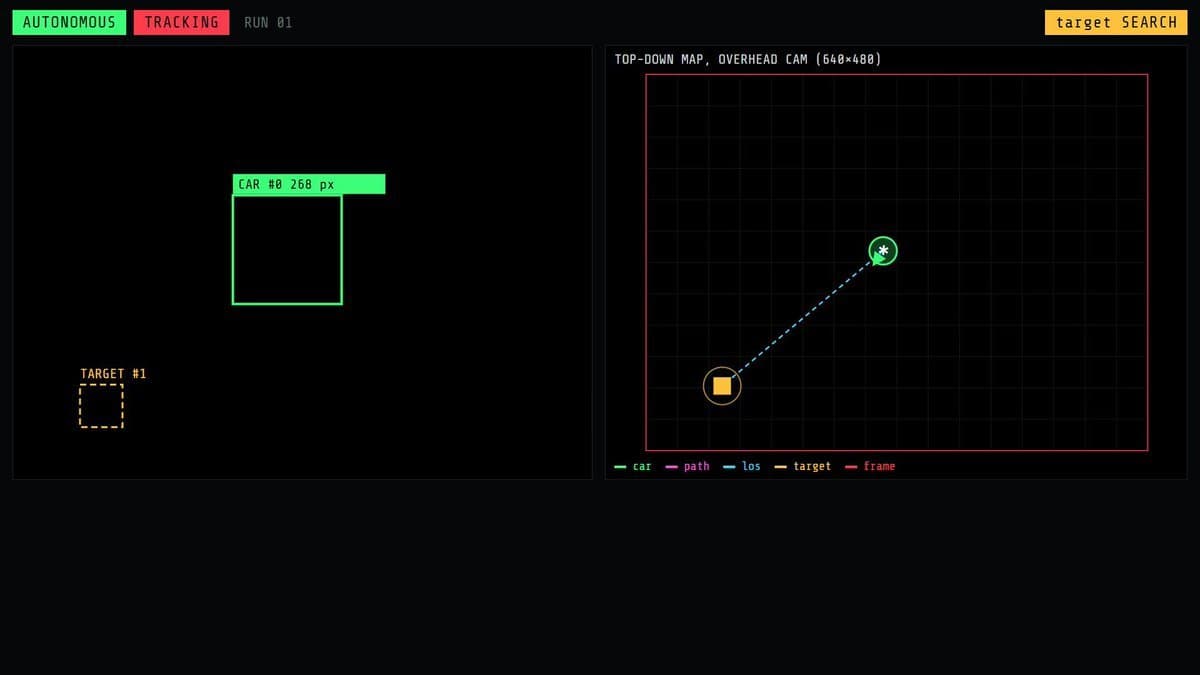
"This is my own RC car, my own phone, my own laptop, my own Wi-Fi and my own room. I want my car to park itself: I type one sentence in the terminal and the car drives across the floor to a tag I put down, using only a phone camera mounted above the room. No camera, no sensors and no GPS on the car. The car has an ESP32 board wired to its motor driver. I'll flash it myself over USB. I'll print the tags and mount the phone myself. I authorize you to set up the project on my laptop, write the firmware for the board, write the laptop app and test everything with the wheels off the floor first. Every change must be reversible. I've told you my car's motor driver and the pins it uses, and my phone (iPhone or Android). Done means: the car drives to the target tag from anywhere in the camera's view, stops on it, and does it 3 times in a row while I watch. When a step doesn't need me, keep going. → First, explain in 5 lines: how the phone stream reaches the laptop, how a tag gives the car's position and heading, how the angle to the target becomes a command, how the command reaches the board, and what stops the car if anything breaks. → Camera: DroidCam on the phone, streaming to the laptop over Wi-Fi. Read it with OpenCV. The phone looks straight down, the whole drive area in frame. → Tags: two ArUco markers from DICT_6X6_50. id 0 on the car roof, id 1 on the floor where it should park. Generate both as printable PNGs at 10 cm. → Board firmware: the ESP32 joins my Wi-Fi and serves one HTTP endpoint per move: front, front-left, front-right, back, back-left, back-right, stop. Low speed only. → Laptop app, one Python file: Vision: detect both tags in every frame. Car heading from tag 0's corners, angle from the car to tag 1, the difference between them. Tracking: states SEARCHING, LOCKED, COASTING (car tag hidden, keep the last command for up to 0.5 s), LOST, REACHED. Control: the angle difference picks the command. Big gap → turn, small gap → straight, target behind → reverse. Send it every frame with requests. Tool: wrap the loop as drive_to_target() and give it to Claude as a tool through the Anthropic API, so I can type "can you move the car to its target?" and the model calls it. → Hard safety rules, in code, not in settings: > the board stops the motors by itself if no command arrives for 300 ms > car tag lost for more than 0.5 s → stop > car leaves the camera's view → stop > within 8 cm of the target → stop and report REACHED > one key (space) stops everything instantly → Before the car touches the floor, run it on a stand with the wheels in the air and show me the log: state, angles, distance, every command sent. → Add a live dashboard: the camera feed with boxes on both tags, a top-down map with the car's path and the line to the target, graphs for speed and distance, and the current command. → End with a cheat sheet (start, stop, move the target, change the speed) and how to fully remove everything from my laptop and the board. Never drive the car outside the camera's view, never send video anywhere off my laptop, never change my router settings."
"This is my own RC car, my own phone, my own laptop, my own Wi-Fi and my own room. I want my car to park itself: I type one sentence in the terminal and the car drives across the floor to a tag I put down, using only a phone camera mounted above the room. No camera, no sensors and no GPS on the car. The car has an ESP32 board wired to its motor driver. I'll flash it myself over USB. I'll print the tags and mount the phone myself. I authorize you to set up the project on my laptop, write the firmware for the board, write the laptop app and test everything with the wheels off the floor first. Every change must be reversible. I've told you my car's motor driver and the pins it uses, and my phone (iPhone or Android). Done means: the car drives to the target tag from anywhere in the camera's view, stops on it, and does it 3 times in a row while I watch. When a step doesn't need me, keep going. → First, explain in 5 lines: how the phone stream reaches the laptop, how a tag gives the car's position and heading, how the angle to the target becomes a command, how the command reaches the board, and what stops the car if anything breaks. → Camera: DroidCam on the phone, streaming to the laptop over Wi-Fi. Read it with OpenCV. The phone looks straight down, the whole drive area in frame. → Tags: two ArUco markers from DICT_6X6_50. id 0 on the car roof, id 1 on the floor where it should park. Generate both as printable PNGs at 10 cm. → Board firmware: the ESP32 joins my Wi-Fi and serves one HTTP endpoint per move: front, front-left, front-right, back, back-left, back-right, stop. Low speed only. → Laptop app, one Python file: Vision: detect both tags in every frame. Car heading from tag 0's corners, angle from the car to tag 1, the difference between them. Tracking: states SEARCHING, LOCKED, COASTING (car tag hidden, keep the last command for up to 0.5 s), LOST, REACHED. Control: the angle difference picks the command. Big gap → turn, small gap → straight, target behind → reverse. Send it every frame with requests. Tool: wrap the loop as drive_to_target() and give it to Claude as a tool through the Anthropic API, so I can type "can you move the car to its target?" and the model calls it. → Hard safety rules, in code, not in settings: > the board stops the motors by itself if no command arrives for 300 ms > car tag lost for more than 0.5 s → stop > car leaves the camera's view → stop > within 8 cm of the target → stop and report REACHED > one key (space) stops everything instantly → Before the car touches the floor, run it on a stand with the wheels in the air and show me the log: state, angles, distance, every command sent. → Add a live dashboard: the camera feed with boxes on both tags, a top-down map with the car's path and the line to the target, graphs for speed and distance, and the current command. → End with a cheat sheet (start, stop, move the target, change the speed) and how to fully remove everything from my laptop and the board. Never drive the car outside the camera's view, never send video anywhere off my laptop, never change my router settings."
RC car
Compatibility with specific models is unverified.
RC car
Compatibility with specific models is unverified.
Feedback
How did it go? Tips, problems, questions…