Project
- Stars
- Started
- Issues
- License
Turn your Kindle into an interactive photo frame
Use Claude Code to jailbreak a compatible Kindle, prepare scanned photos, and build an e-ink slideshow app with touch controls, clock, and weather.
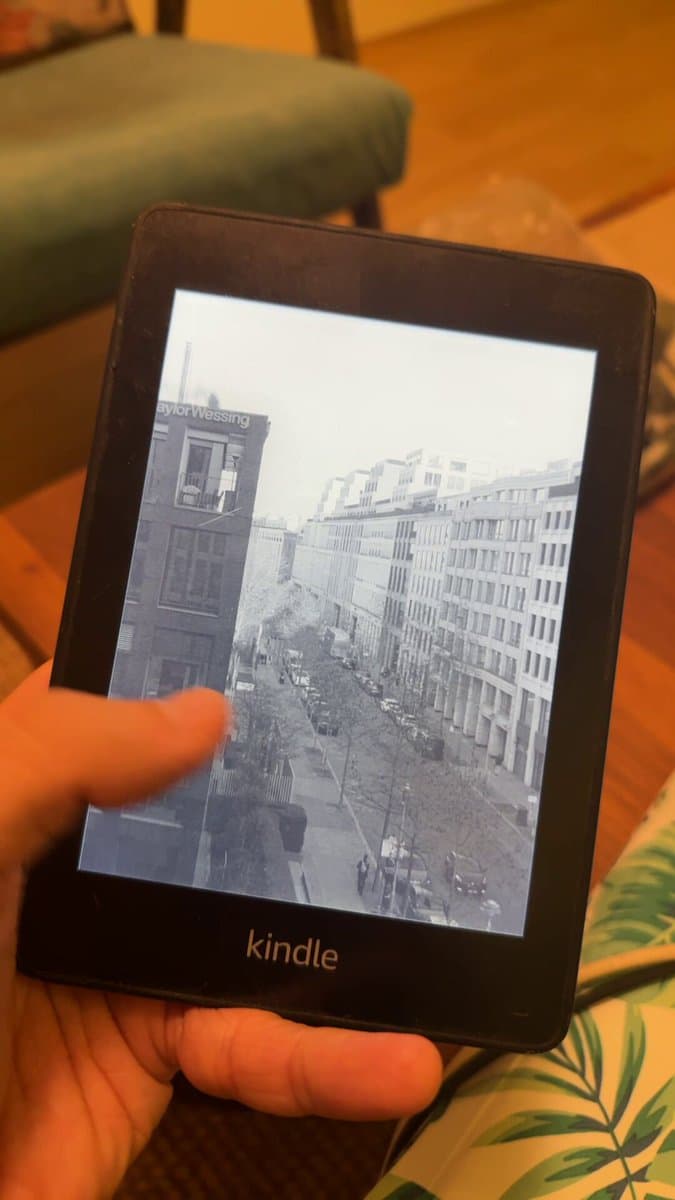
Accuracy-adapted prompt based on the linked source: I want to turn my Amazon Kindle into an e-ink photo frame for my scanned film photos. The Kindle is plugged into this computer over USB (a data cable, not charge-only). Do all the file work yourself; I only press buttons on the Kindle. I'd rather not unplug the cable, so plan every USB copy into as few sessions as possible. PART 1: JAILBREAK 1. Identify the Kindle from its USB info, serial prefix and /system/version.txt. Ask me to confirm the firmware on screen (Settings > Device Options > Device Info). 2. Use the http://kindlemodding.org/ jailbreak wizard data (jailbreaks.json, models.json) to pick the current method for that exact model and firmware. Prefer one that needs no Amazon registration and no factory reset. If none exists, tell me and stop. Never factory-reset or deregister the Kindle. 3. Before any Wi-Fi: block firmware updates by filling storage until 50-90 MB stay free (kindlemodding "prevent auto-update"). Tell me how long that will take. 4. Download only from official sources. Check each file's sha256 against the published release digest, read what any script will run, and confirm that a payload fetched live (e.g. http://kindlemodding.org/jb.sh) matches its GitHub release. 5. Stage everything in one USB session, eject from the computer yourself, then give me numbered taps written for this firmware's actual menus. Assume I don't know where Home, ⋮, or the Experimental Browser are. 6. After the jailbreak reboot, reconnect using the USB storage or MTP method documented for this model. Run a watcher that verifies the jailbreak (e.g. documents/JAILBROKEN.txt, /mnt/us/libkh/bin/fbink), confirms OTA updates are disabled before deleting filler files, and ejects again. 7. Launch apps through scriptlets (.sh files in documents/ with "# Name:" headers, run as root by the jailbreak) instead of KUAL. Optional: KOReader via ";kpm install koreader". PART 2: PHOTOS Resize my scans (a zip or folder) to the panel resolution as grayscale JPEG q80 with light sharpening (unsharp with a threshold so film grain isn't boosted). Portrait shots fill the screen when cropping loses at most ~12%; landscape shots sit on a black mat. Apply a gentle per-image contrast stretch for thin negatives. Show me a contact sheet, flag blank or leader frames, and skip them. PART 3: FRAME APP (static binary for the Kindle, testable on this computer) - Idle: the bare photo, full screen. Change every 30 minutes, in shuffle order (each photo once before any repeats, position saved), plus random and name orders. - Tap: the clock (large, light weight) and a weather line ("12°C · Partly cloudy" + icon, from Open-Meteo, no key) fade in over a dark top band in a few partial updates; a thin rule draws from the centre out; hold 6 s; fade out; then a flashing full refresh clears ghosting. Swipe = next/previous; hold 3 s = exit. - Dither to the panel's 16 gray levels with an ordered pattern so partial updates leave no seams; send only the changed rectangle through FBInk. - Pause the stock UI the way KOReader does (pillow off, SIGSTOP awesome/volumd, stop OTA services) and restore it on any exit, including crashes (shell trap). - Handle system Dark Mode (the panel inverts in hardware): read the framebuffer grayscale flag and send negatives, without changing the setting. - Power saving: deep sleep between photo changes with an RTC wake alarm, wake on the power button for the overlay, fall back to staying awake on the charger, Wi-Fi on only while fetching weather, front light off. - Render a preview GIF of the touch sequence on this computer before the device runs it. - Pin dependencies to releases at least two weeks old. Commit as you go. Warn me before anything risky, and confirm each step on the device before moving on.
Accuracy-adapted prompt based on the linked source: I want to turn my Amazon Kindle into an e-ink photo frame for my scanned film photos. The Kindle is plugged into this computer over USB (a data cable, not charge-only). Do all the file work yourself; I only press buttons on the Kindle. I'd rather not unplug the cable, so plan every USB copy into as few sessions as possible. PART 1: JAILBREAK 1. Identify the Kindle from its USB info, serial prefix and /system/version.txt. Ask me to confirm the firmware on screen (Settings > Device Options > Device Info). 2. Use the http://kindlemodding.org/ jailbreak wizard data (jailbreaks.json, models.json) to pick the current method for that exact model and firmware. Prefer one that needs no Amazon registration and no factory reset. If none exists, tell me and stop. Never factory-reset or deregister the Kindle. 3. Before any Wi-Fi: block firmware updates by filling storage until 50-90 MB stay free (kindlemodding "prevent auto-update"). Tell me how long that will take. 4. Download only from official sources. Check each file's sha256 against the published release digest, read what any script will run, and confirm that a payload fetched live (e.g. http://kindlemodding.org/jb.sh) matches its GitHub release. 5. Stage everything in one USB session, eject from the computer yourself, then give me numbered taps written for this firmware's actual menus. Assume I don't know where Home, ⋮, or the Experimental Browser are. 6. After the jailbreak reboot, reconnect using the USB storage or MTP method documented for this model. Run a watcher that verifies the jailbreak (e.g. documents/JAILBROKEN.txt, /mnt/us/libkh/bin/fbink), confirms OTA updates are disabled before deleting filler files, and ejects again. 7. Launch apps through scriptlets (.sh files in documents/ with "# Name:" headers, run as root by the jailbreak) instead of KUAL. Optional: KOReader via ";kpm install koreader". PART 2: PHOTOS Resize my scans (a zip or folder) to the panel resolution as grayscale JPEG q80 with light sharpening (unsharp with a threshold so film grain isn't boosted). Portrait shots fill the screen when cropping loses at most ~12%; landscape shots sit on a black mat. Apply a gentle per-image contrast stretch for thin negatives. Show me a contact sheet, flag blank or leader frames, and skip them. PART 3: FRAME APP (static binary for the Kindle, testable on this computer) - Idle: the bare photo, full screen. Change every 30 minutes, in shuffle order (each photo once before any repeats, position saved), plus random and name orders. - Tap: the clock (large, light weight) and a weather line ("12°C · Partly cloudy" + icon, from Open-Meteo, no key) fade in over a dark top band in a few partial updates; a thin rule draws from the centre out; hold 6 s; fade out; then a flashing full refresh clears ghosting. Swipe = next/previous; hold 3 s = exit. - Dither to the panel's 16 gray levels with an ordered pattern so partial updates leave no seams; send only the changed rectangle through FBInk. - Pause the stock UI the way KOReader does (pillow off, SIGSTOP awesome/volumd, stop OTA services) and restore it on any exit, including crashes (shell trap). - Handle system Dark Mode (the panel inverts in hardware): read the framebuffer grayscale flag and send negatives, without changing the setting. - Power saving: deep sleep between photo changes with an RTC wake alarm, wake on the power button for the overlay, fall back to staying awake on the charger, Wi-Fi on only while fetching weather, front light off. - Render a preview GIF of the touch sequence on this computer before the device runs it. - Pin dependencies to releases at least two weeks old. Commit as you go. Warn me before anything risky, and confirm each step on the device before moving on.
How did it go? Tips, problems, questions…
Turn your Kindle into an interactive photo frame
Use Claude Code to jailbreak a compatible Kindle, prepare scanned photos, and build an e-ink slideshow app with touch controls, clock, and weather.
Feedback
How did it go? Tips, problems, questions…