Project
- Stars
- Started
- Issues
- License
Build a dashboard for a compatible Kindle
Check your Kindle’s model and firmware, then build a refreshed dashboard from a Mac. Jailbreaking and ad removal depend on device compatibility.
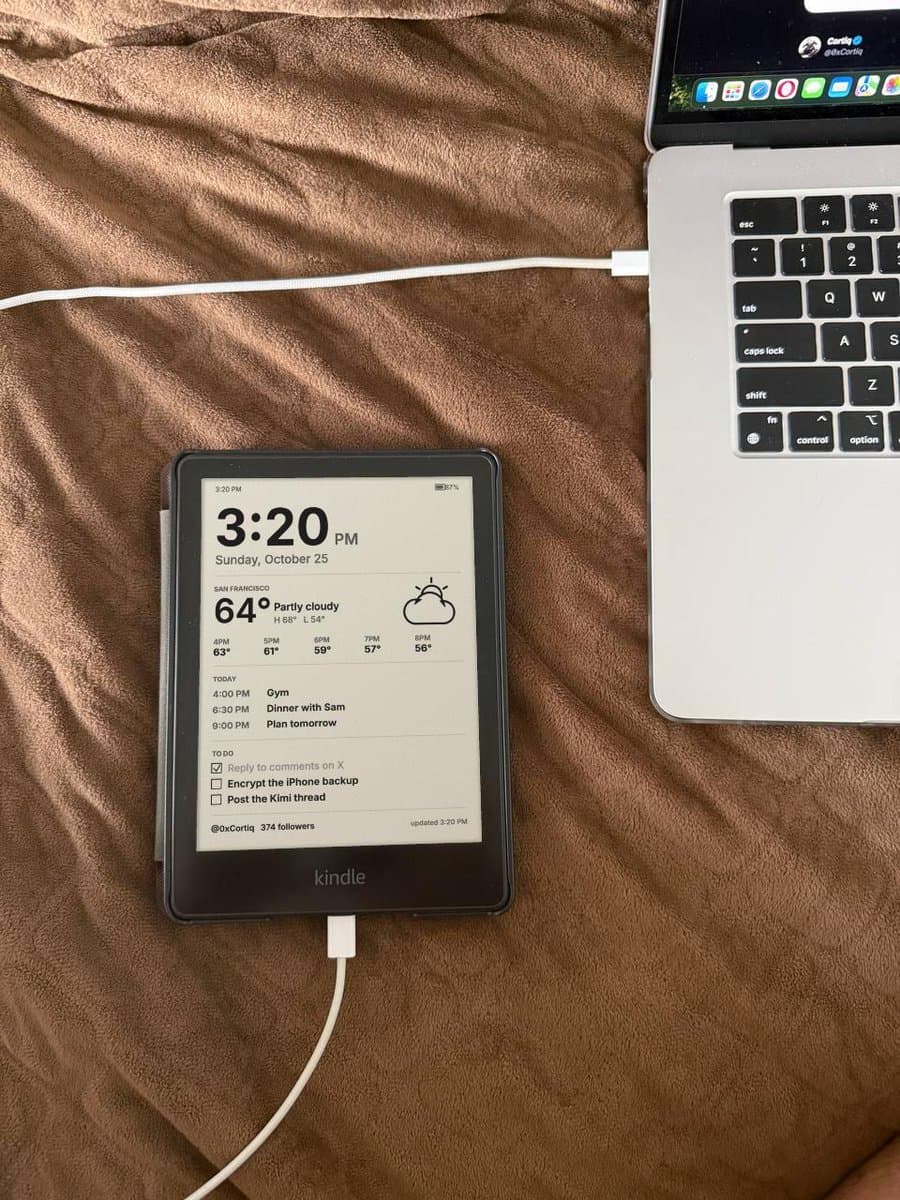
Accuracy-adapted prompt based on the linked source: My Kindle is connected to this Mac over USB. Help me turn it into an ad-free dashboard. 1. Read the model and firmware version from the device (version.txt or Settings > Device info) and tell me exactly which model I have. 2. Check whether a community jailbreak exists for that firmware (KindleModding wiki, MobileRead forums). If it does, walk me through it step by step. If it doesn't, stop and tell me, and use the built-in browser as plan B. 3. Check available lock-screen ad-removal options. Amazon may charge a one-time fee; show the price and ask before any purchase. Only consider a community method documented for this model and firmware. 4. Install KUAL and a dashboard tool (like kindle-dash) that shows a full-screen PNG and refreshes every 15 minutes. 5. Write a small script on my Mac that builds a grayscale PNG matching this Kindle’s actual panel resolution with: time, date, weather for [city], next 5 hours, today's calendar, my to-do list and my X follower count. Push it to the Kindle. 6. Before anything risky, tell me what could brick the device and how to undo it. works best on older Kindles, newer firmware is often patched
Accuracy-adapted prompt based on the linked source: My Kindle is connected to this Mac over USB. Help me turn it into an ad-free dashboard. 1. Read the model and firmware version from the device (version.txt or Settings > Device info) and tell me exactly which model I have. 2. Check whether a community jailbreak exists for that firmware (KindleModding wiki, MobileRead forums). If it does, walk me through it step by step. If it doesn't, stop and tell me, and use the built-in browser as plan B. 3. Check available lock-screen ad-removal options. Amazon may charge a one-time fee; show the price and ask before any purchase. Only consider a community method documented for this model and firmware. 4. Install KUAL and a dashboard tool (like kindle-dash) that shows a full-screen PNG and refreshes every 15 minutes. 5. Write a small script on my Mac that builds a grayscale PNG matching this Kindle’s actual panel resolution with: time, date, weather for [city], next 5 hours, today's calendar, my to-do list and my X follower count. Push it to the Kindle. 6. Before anything risky, tell me what could brick the device and how to undo it. works best on older Kindles, newer firmware is often patched
How did it go? Tips, problems, questions…
Build a dashboard for a compatible Kindle
Check your Kindle’s model and firmware, then build a refreshed dashboard from a Mac. Jailbreaking and ad removal depend on device compatibility.
Feedback
How did it go? Tips, problems, questions…